Blue Origin Rockets First Wheelchair User Into Space: Michaela Benthaus Soars Beyond Earth and Expectations

Introduction
On a clear morning in West Texas, history was made not just in the heavens, but in the hearts of millions watching from Earth. As the New Shepard rocket roared skyward, carrying its crew of six toward the edge of space, one passenger carried a hope far heavier than gravity: Michaela Benthaus, a 34-year-old paraplegic engineer, became the first wheelchair user to reach space and experience true weightlessness.
Her journey—lasting just over 10 minutes but resonating for a lifetime—shattered a long-standing barrier in the aerospace world. For decades, spaceflight remained an exclusive domain, accessible only to those who met rigid physical criteria rooted in Cold War-era astronaut selection. But with Blue Origin’s inclusive capsule design and a chance offer from a visionary former SpaceX executive, Benthaus transcended not only Earth’s atmosphere but also the outdated notion that disability disqualifies one from the final frontier.
“I never really thought that going on a spaceflight would be a real option for me,” she later told the Associated Press, her voice brimming with disbelief and joy. “Even as a super healthy person, it’s so competitive—let alone as someone with a spinal cord injury.”
Her flight marks far more than a personal triumph; it is a pivotal moment in the democratization of space, signaling that accessibility is no longer an afterthought—it is an imperative.
A Dream Unexpected: From Doubt to Liftoff
Seven years ago, Benthaus’s life changed in an instant during a mountain biking accident that severely damaged her spinal cord, leaving her paralyzed from the waist down. An accomplished mechanical engineer with a passion for robotics and human-centered design, she channeled her energy into adaptive technologies, never imagining that space itself could be part of her future.
Then, in early 2025, she received an email that seemed too surreal to be real. Hans Koenigsmann, former Vice President of Build and Flight Reliability at SpaceX and a respected figure in commercial spaceflight, was organizing a private New Shepard mission focused on inclusion and representation. Having learned of Benthaus’s work in accessibility engineering, he extended an invitation: a fully sponsored seat aboard Blue Origin’s next suborbital flight.
“I thought it was a mistake,” Benthaus admitted. “There is like no history of people with disabilities flying to space. I assumed they must have confused me with someone else.”
But Koenigsmann was certain. He had long advocated for reevaluating physical requirements in space travel, arguing that modern spacecraft—unlike the cramped capsules of the 1960s—were designed for comfort, automation, and passenger safety, not athletic endurance. Blue Origin’s New Shepard capsule, with its spacious 530 cubic feet of cabin volume, large windows, and automated flight systems, required no piloting and minimal physical exertion—making it uniquely suited for inclusive access.
After confirming the offer was genuine, Benthaus accepted without hesitation.
Preparation Beyond Gravity: Training for the Impossible
Though New Shepard flights are largely automated, passengers still undergo preparation to manage the physical stresses of launch and reentry. Benthaus completed a two-week simulated space mission at the Łukasiewicz Research Network in Poland, where she practiced emergency procedures, communication protocols, and cabin orientation in a mock-up designed to accommodate mobility devices.
She also participated in a parabolic flight out of Ellington Field near Houston—a modified aircraft that flies roller-coaster-like arcs to create 20–25 seconds of weightlessness at a time. For Benthaus, these moments were revelatory. “Floating wasn’t just fun—it was liberating,” she said. “For the first time since my injury, I wasn’t ‘in’ a body that limited me. I just was.”
Crucially, Blue Origin engineers worked closely with her to ensure the capsule’s layout supported her needs. While she transferred to a standard seat for launch (as all passengers do for safety harnessing), her wheelchair was stored securely in the cabin and returned to her immediately after landing. The seat itself was equipped with customized padding and restraint adjustments, developed in consultation with rehabilitation specialists.
This collaboration exemplifies a new paradigm: accessibility by design, not retrofit.
The Flight: Ten Minutes That Changed Everything
On the morning of the launch, Benthaus joined five other passengers—including Koenigsmann, a climate scientist, a high school teacher, and two philanthropists—aboard the New Shepard capsule. At 9:12 a.m. local time, the rocket ignited, accelerating to Mach 3 in under two minutes.
At an altitude of 65.8 miles (well above the U.S.-recognized Kármán line of 50 miles), the capsule separated from the booster and entered microgravity. For three minutes and forty seconds, Benthaus floated freely, gazing out the largest windows ever flown in space at the curvature of Earth, the blackness of space, and the thin blue line of the atmosphere.
“I kept whispering, ‘This is real. This is really happening,’” she recalled. “There were no barriers up there—no stairs, no ramps, no stares. Just silence, beauty, and weightlessness.”
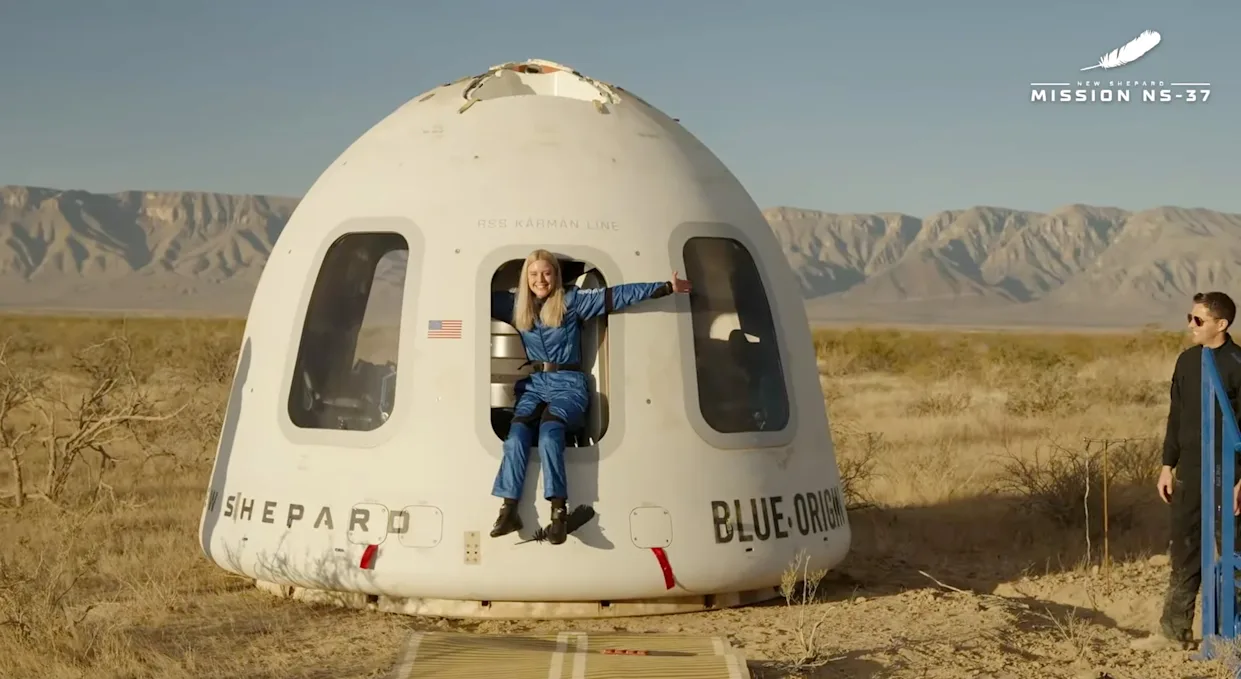
During descent, the capsule deployed parachutes for a gentle return, touching down softly in the Texas desert. Within minutes, recovery teams assisted Benthaus back into her wheelchair—a moment captured in a now-iconic photo showing her beaming, arms raised in triumph, with the New Shepard capsule steaming behind her.
Why This Milestone Matters: Beyond Symbolism
Benthaus’s flight is more than a feel-good story; it is a catalyst for systemic change in aerospace. For too long, space agencies and companies used medical disqualifications rooted in 1960s astronautics—when human piloting was essential and survival margins razor-thin. Today’s commercial vehicles, however, are fly-by-wire, autonomous, and passenger-optimized. Physical strength is irrelevant; cognitive awareness and medical stability are what matter.
Blue Origin’s success demonstrates that inclusive spaceflight is technically feasible today—not in some distant future. And it sets a precedent for competitors: Virgin Galactic and SpaceX are now under public and investor pressure to publish accessibility roadmaps.
Moreover, Benthaus’s presence challenges deep-seated biases about disability. As she noted, “People assume that because I use a wheelchair, I’m fragile. But I’ve engineered robotic arms, coded AI models, and led teams in extreme environments. Space doesn’t care about your legs—it cares about your mind and your heart.”
Her flight also opens doors for scientific research. How does microgravity affect individuals with spinal cord injuries? Could space-based rehabilitation offer new insights? These are now valid, urgent questions.
The Road Ahead: Toward Truly Inclusive Space Travel
While Benthaus’s journey is historic, it must not be an isolated event. Advocates are calling for:
- Standardized accessibility guidelines for commercial space vehicles
- Funding programs for disabled scientists, artists, and educators to fly
- Inclusive design mandates in future spacecraft (e.g., transfer aids, tactile controls, adjustable seating)
Blue Origin has pledged to integrate universal design principles into all future capsules. Koenigsmann’s nonprofit, Horizon Inclusion Initiative, plans to sponsor at least one disabled passenger per year across multiple launch providers.
Benthaus herself has launched the “Zero G Access Project”, a global coalition pushing for equitable space opportunities. “This isn’t just about me,” she insists. “It’s about proving that space belongs to everyone—regardless of ability, gender, race, or background.”
Conclusion: A New Constellation of Possibility
When Michaela Benthaus floated above Earth, she did more than fulfill a dream—she redefined what is possible. Her flight is a testament to the power of inclusive engineering, human empathy, and the quiet courage of those who refuse to accept limits imposed by others.
In a world often divided by difference, space remains one of the few unifying frontiers. And now, thanks to Benthaus and her unlikely allies, that frontier is a little more welcoming, a little more just, and infinitely more inspiring.
As she put it upon landing: “If you can see yourself in space, you can reach it. And today, for the first time, millions of people with disabilities can finally see themselves there too.”